
Microsoft Journal
for Windows- Name Microsoft Journal
- Category Productivity
- Downloads 30,000,000+
- Developer Microsoft Corporation
- Available on PC
- OS Windows 10 version 19042.0 or higher
- Architecture x64, Arm64
- Memory 4 GB
- Touch Not specified



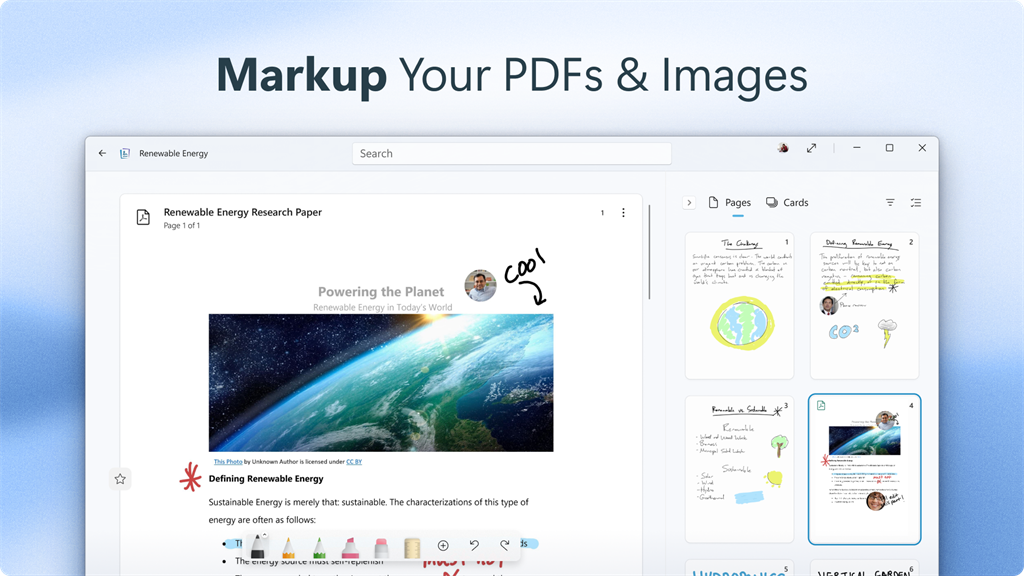





Pros
1. Organization: Microsoft Journal enables users to create, organize, and manage digital notes efficiently. Its intuitive interface allows for easy categorization, tagging, and searching, facilitating quick access to relevant information.
2. Flexibility: With Microsoft Journal, users can effortlessly incorporate various media formats, such as text, images, drawings, and audio recordings, into their notes. This versatile software supports comprehensive note-taking across different formats, enhancing productivity and creativity.
3. Integration: Microsoft Journal seamlessly integrates with other Microsoft applications, including OneNote, Outlook, and SharePoint. This enables streamlined collaboration, sharing, and synchronization across devices, ensuring efficient teamwork and seamless access to notes on multiple platforms.
Cons
1. Limited compatibility with other software: Microsoft Journal is only compatible with Windows devices, limiting its usability for users who work across different operating systems or need to share files with colleagues using different software.
2. Lack of advanced features: Compared to other note-taking apps, Microsoft Journal has a limited range of features, lacking functionalities such as text formatting options, advanced organization features, and robust collaboration tools.
3. Dependency on Microsoft account: To use Microsoft Journal, users are required to have a Microsoft account, which may be inconvenient for those who prefer not to rely on a single account for their note-taking needs or have privacy concerns related to sharing their data with a company account.


